Auto Agent
- 4.8
- Rating
- 100.00K
- Installs
- Free
- Price

 Analysis by App-foxy
If you are looking for a way to interact with a supported vehicle from your phone, Auto Agent is the kind of app that makes more sense as part of a vehicle setup than as a standalone download. I found it most useful when I treated it as a working dashboard for monitoring, diagnosing, and reprogramming rather than as a general car companion. That distinction matters: the app can be valuable for the right vehicle and hardware arrangement, but it is not a universal replacement for a mechanic, a basic maintenance log, or a simple navigation app.
Developed by EZ LYNK, Auto Agent sits in the Auto & Vehicles category and is free to install. Its Everyone age rating makes the app approachable from a content standpoint, while the practical learning curve comes from understanding how it connects to a vehicle and what each available action actually means. The app has earned a 4.9 average from around 2.9 thousand ratings, with more than 100 thousand installs, which suggests that its audience is fairly focused and generally satisfied with what it does.
My main advice for a first-time user is to begin with observation, not reprogramming. Monitoring the vehicle and learning how information is presented gives you a safer, clearer first success. Once you understand the connection and the available controls, the more advanced parts of the app become easier to approach without guessing.
You May Also Like

 Google Keep - Notes and lists
Google Keep’s Quiet Growth Shows the Appeal of Simpler Notes
As mobile work gets busier, Google Keep keeps winning a simple contest: capture a thought quickly, find it later, and get on with the day.

 Blood Strike: 2.5 Anniversary
Blood Strike’s Loadouts Turn Every Drop Into a Tactical Gamble
A close look at Blood Strike’s custom loadouts: how fast access to signature weapons reshapes its battle royale rhythm, rewards preparation, and narrows the gap between fights.

 Pandora - Music & Podcasts
Pandora’s Music Is Easy to Start, but Harder to Recover
Pandora’s strength is its low-effort path from a seed to a station. Its weak spot is how much confidence it asks you to place in connection, setup, and quiet recovery.

 8 Ball Pool
 Is Built on Rivalries, Rematches, and Routine
A close look at the rivalries, rematches, shared routines, and unanswered safety questions that turn a quick pool match into a persistent mobile community.

 Samsung Music
’s Quiet Strength Is Playing What You Already Own
Its reach comes less from spectacle than from dependable access to a personal library. That simplicity is both the app’s strongest retention engine and its ceiling.

 AccuWeather: Weather Radar
AccuWeather Review: A Quick, Clear Forecast for Everyday Decisions
For everyday plans, the best forecast is the one you can understand quickly. AccuWeather makes rain timing, radar, and local conditions easy to act on, with a few trade-offs.
More From Our News Desk



What to expect before opening Auto Agent
Auto Agent is not designed to be useful in exactly the same way for every driver. Its purpose is tied to vehicle communication, so the experience depends heavily on the vehicle, the compatible setup around it, and the access available to you. If you install it expecting an app that can immediately scan any car through the phone alone, you may be disappointed. If you already use a compatible vehicle interface or have been directed to the app as part of a vehicle-related setup, its role becomes much clearer.
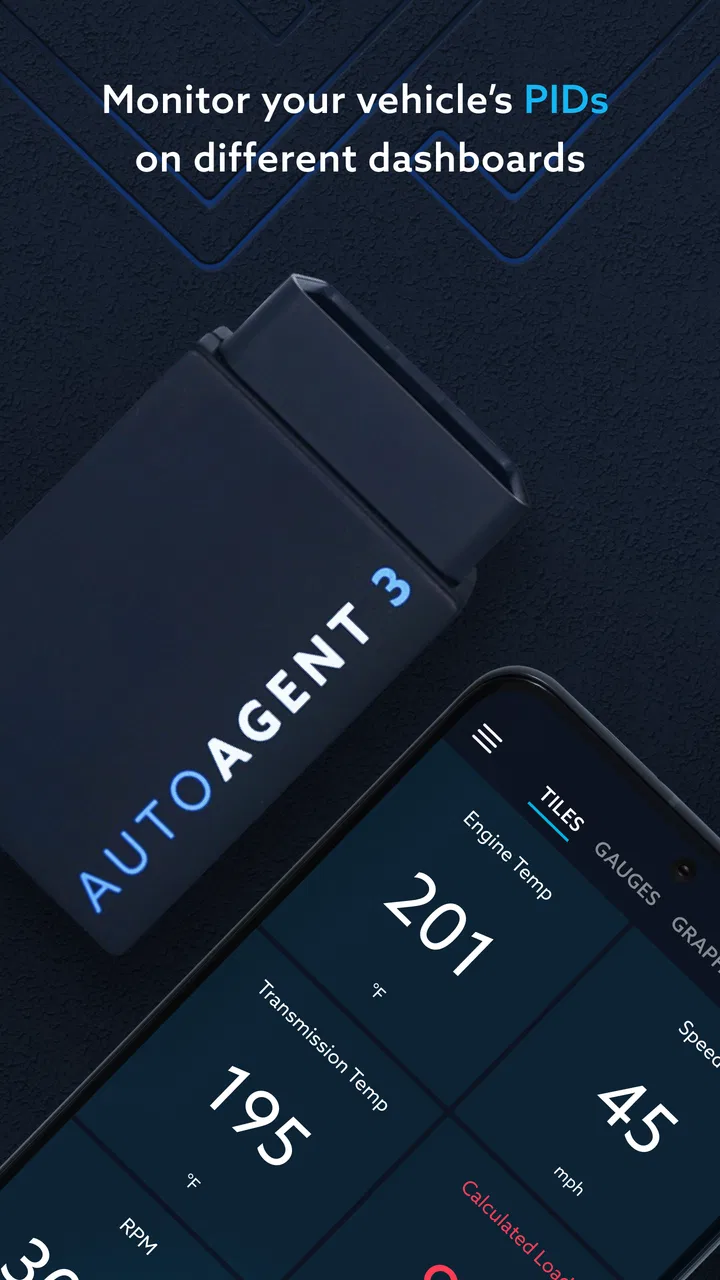
The three central jobs are monitoring, diagnosis, and reprogramming. Monitoring is the easiest place to begin because it helps you see what the app is communicating about the vehicle. Diagnosis is more useful when something needs investigation, especially if you want more context before deciding whether a workshop visit is necessary. Reprogramming is the area where caution matters most, because changing vehicle software is not the same as checking a dashboard reading.
I would describe the app as a technical tool presented through a mobile interface. That makes it more convenient than carrying a separate computer for every basic check, but it also means the user has to take responsibility for interpreting what appears on screen. A displayed alert is a reason to investigate, not automatically a complete explanation of the underlying fault.
The current release is version 1.35.1, and the app supports devices running Android 6.0 or later. It is free to download, although in-app purchases range from $1.99 to $199.99 per item. That range is worth noticing before you commit to a particular workflow. The installation itself may cost nothing, but some vehicle-related functions or connected services can involve purchases, so I would review each prompt carefully instead of assuming every part of the experience is included.
Who will get the most from it
Auto Agent is a strong fit for someone who wants closer involvement with a supported vehicle and is comfortable following technical instructions. It can also suit an owner who wants to gather useful information before contacting a technician, rather than describing a problem only from memory. In that situation, having the app available can make a conversation more precise.
It is less suitable for a driver who wants a universal diagnostic reader with no setup decisions. It is also not the best first choice for someone who only needs reminders for oil changes, fuel tracking, trip recording, or roadside assistance. Those jobs are handled more simply by ordinary maintenance apps or the vehicle manufacturer’s general-purpose companion app when one is available.
Another important boundary is confidence. If you are not sure what a reprogramming option changes, do not select it just to see what happens. The app can put advanced vehicle control within reach, but convenience should not be confused with permission to experiment casually.
Getting through the first setup
For a smooth start, I would install Auto Agent before sitting in a hurry beside the vehicle. Make sure the phone is ready, the vehicle is accessible, and any required connection equipment or account details are available. This simple preparation prevents the most frustrating first-session mistake: opening the app with no way to establish a meaningful connection and then assuming the app itself is broken.
After launching, take a moment to identify what the app is asking you to connect or select. The first setup should be treated as a matching process. The app needs to know which vehicle environment it is communicating with, and the user needs to understand which actions are available for that environment. If a screen presents several choices, read the labels instead of tapping through quickly.
I recommend keeping the first session deliberately narrow. Do not try to explore every menu while the vehicle is active. First confirm that the app recognizes the intended connection, then look for a monitoring or status view. This creates a useful checkpoint: you know the phone, app, and vehicle are communicating before you attempt anything more involved.
A practical tip is to capture your own notes during setup. Write down which vehicle you connected, what the first status screen showed, and whether any warning appeared before you changed anything. This is especially helpful if you manage more than one vehicle or return to the app only occasionally. It also gives you a baseline for later comparisons instead of relying on memory.
The interface may feel more technical than a typical consumer app because the subject is technical. I did not find that a reason to abandon it, but I did find it important to slow down. A button that sounds like a routine check may lead toward a more consequential vehicle operation. Read the surrounding text, and if the app requests confirmation, treat that confirmation as meaningful rather than as a formality.
The first meaningful success: verify before changing
Your first success should be a confirmed monitoring session. Once Auto Agent displays information from the intended vehicle, you have proved the most important part of the initial workflow: the app is connected to the right system and is receiving useful information. That is a better starting point than immediately attempting a reprogramming task.
Use this first session to learn the rhythm of the app. Notice how it separates ordinary information from diagnostic details, and pay attention to whether a message is describing current status, a stored issue, or an action that requires your decision. Even without changing anything, this familiarization can save time later when you are trying to understand a warning under pressure.
A realistic example would be a driver who notices unusual vehicle behavior before a planned trip. Instead of guessing from a dashboard light or searching through unrelated forums, the driver can connect through the established setup, check the available diagnostic information, and record what appears. That does not turn the phone into a mechanic, but it gives the driver a more informed starting point when deciding whether to stop driving, arrange service, or continue monitoring.
The useful trade-off here is detail versus interpretation. Auto Agent can bring vehicle information closer to the owner, but the owner still has to decide what the information means in context. A code or status message may point toward a system without identifying every physical cause. I would use the app to narrow the conversation and spot changes, not to make a safety-critical repair decision from a single screen.
Another non-obvious benefit is the value of a baseline. A first clean monitoring session, or simply a recorded normal state, can help you recognize what has changed later. This is more useful than opening the app only after a problem becomes severe. Regular observation can turn the app from an emergency-only tool into a record of how your vehicle behaves over time, provided you remain consistent about when and how you check it.
Where diagnosis helps, and where it stops
Diagnosis is the app’s most practical middle ground. It offers more direction than a basic dashboard but does not remove the need for mechanical judgment. I like this part of the workflow because it can prevent two opposite mistakes: ignoring a meaningful warning and panicking over a message that needs context.
When a diagnostic result appears, read the entire screen and note whether the app offers a next action. Avoid clearing or dismissing information simply because the warning is inconvenient. If the issue returns, the history of what appeared and when it appeared may help a technician. A screenshot or written note can be more useful than trying to remember a short code later.
This is also where Auto Agent compares favorably with a basic generic scanner in some situations. A simple scanner may show a code and leave the user to search for an explanation. Auto Agent is built around a broader vehicle-management workflow, so it can feel more connected to the vehicle rather than merely reporting a number. However, a generic scanner may be the better choice if you need broad compatibility across unrelated vehicles and do not want to commit to a particular connected ecosystem.
Reprogramming deserves a separate mindset
Reprogramming is not a feature I would approach as casual experimentation. Before using it, confirm that you understand the intended result, that the vehicle is in the required condition, and that you have enough time to complete the process without interruption. Do not begin an advanced operation simply because you are curious about the next screen.
The advantage is obvious for an experienced owner or technician: a phone-based workflow can be more convenient than relying on a separate computer. The limitation is equally important: mobile convenience can make a serious operation look deceptively simple. I would choose professional assistance over self-service whenever the instructions are unclear, the vehicle is needed immediately, or the consequences of an interruption are not understood.
For a first-time user, the best next step after monitoring is not necessarily reprogramming. It may be learning the diagnostic view, saving a baseline, and confirming which functions apply to your vehicle. That progression gives you practical knowledge without forcing you to use the most advanced capability too early.
Common confusion and how I would handle it
The first common confusion is assuming that installation equals vehicle access. It does not. Auto Agent is an interface for vehicle-related work, so the connection path matters. If the app opens normally but shows no useful vehicle information, check the physical and account setup before blaming the phone. A successful app launch is not the same as a successful vehicle session.
The second confusion is treating every displayed item as a fault. Monitoring screens can contain information that is informational, historical, or dependent on the current operating state. I would compare the message with the vehicle’s actual symptoms and keep a record of when it appeared. If the vehicle is behaving dangerously, stop and seek qualified help rather than using the app as a reason to continue.
The third confusion concerns purchases. Auto Agent is free to install, but some individual in-app items can cost from $1.99 to $199.99. Before confirming a purchase, check what the item enables and whether it applies to your exact vehicle situation. The price range means that a casual tap can have a very different consequence from a small optional add-on, so this is one place where patience is genuinely useful.
Another point that can surprise new users is the difference between a vehicle diagnosis and a complete repair plan. The app may help you identify where to look, but it cannot replace physical inspection, tools, or qualified judgment. If the result suggests a problem involving braking, steering, fuel, overheating, or another safety-critical area, I would treat the app as supporting evidence and arrange proper evaluation.
Users may also wonder whether Auto Agent is appropriate for every car they own. I would not assume that. Its usefulness depends on the vehicle connection and the functions made available in that setup. If your main requirement is a cross-brand tool for occasional checks on several unrelated vehicles, a broadly compatible diagnostic product may be more practical. Auto Agent makes more sense when its vehicle-specific relationship is part of the reason you installed it.
Small habits that make the app more useful
Begin each new vehicle session by confirming the intended vehicle before opening a diagnostic or programming function.
Keep a simple record of normal readings and warning messages so you can distinguish a new change from a familiar condition.
Use monitoring to build confidence before attempting any operation that modifies vehicle software.
Read purchase confirmations carefully, especially when an item is near the upper end of the app’s in-app price range.
When a result is unclear, preserve the message and discuss it with a qualified technician instead of repeatedly clearing it.
These habits are not glamorous, but they address the real friction in a vehicle app. The challenge is rarely finding a button. It is making sure the button is being used on the right vehicle, for the right reason, at the right time.
How it compares with familiar alternatives
Compared with a standard automotive maintenance app, Auto Agent is much more hands-on. A maintenance tracker is better for service reminders and ownership organization, while Auto Agent is aimed at communication with the vehicle itself. If you only want to remember when tires were changed, this app may be unnecessary work.
Compared with a generic code reader, Auto Agent can offer a more integrated experience when your vehicle and connection setup are a good match. The trade-off is flexibility. Generic readers are often chosen precisely because they can move between vehicles and focus on basic fault access. Auto Agent is the more compelling option when monitoring, diagnosis, and reprogramming belong together in your workflow.
Compared with taking every question directly to a workshop, the app can help you arrive better prepared. You may be able to describe what changed, when it happened, and what the vehicle reported. That can reduce vague back-and-forth, but it does not eliminate professional service. I see Auto Agent as a bridge between noticing a problem and getting an informed assessment, not as a substitute for the assessment itself.
Who should install it and who should skip it
I would recommend Auto Agent to a vehicle owner who already knows why this particular tool is relevant, has the necessary connection arrangement, and wants more direct access to monitoring and diagnosis. It is also a sensible choice for someone who prefers collecting useful information before paying for troubleshooting, as long as they understand the limits of app-based diagnosis.
I would suggest skipping it if you are looking for a simple all-purpose car app, if you have no compatible way to connect it to a vehicle, or if your needs stop at reminders and trip organization. I would also steer away from self-directed reprogramming if you are uncomfortable following technical instructions or cannot afford downtime if something goes wrong.
The app’s high average rating and growing install base are encouraging, but they should not replace a compatibility check or a realistic assessment of your own needs. A highly rated specialist tool can still be the wrong download for a driver who wants a general-purpose utility.
My next-step recommendation
After installing Auto Agent, I would make the first session a quiet verification exercise: establish the connection, identify the vehicle, open the monitoring information, and record what a normal session looks like. Then I would explore diagnosis without changing anything. That sequence creates a meaningful result quickly while keeping the risk low.
Only after that would I consider a more advanced action. Read every confirmation, check the purchase details if an in-app item is involved, and avoid starting a vehicle operation when you are rushed. If the app presents information you cannot interpret, save it and ask a qualified person rather than treating a confident-looking screen as a final answer.
In my experience, Auto Agent is most convincing when used deliberately. It brings vehicle monitoring and diagnosis into a phone-based workflow and can make technical information easier to access, especially for an owner who wants to be involved. Its limitations are just as clear: it is not universal, it can require a thoughtful setup, and its advanced functions demand respect.
My final recommendation is simple: install Auto Agent when you have a clear vehicle-related reason to use it, start with monitoring, and let your first successful connection teach you how the rest of the app fits together. For the right driver, it is a useful specialist tool from EZ LYNK; for everyone else, a simpler maintenance app or a broadly compatible diagnostic alternative may be the better choice.
FAQs for Auto Agent
01What platforms is Auto Agent available on?
Auto Agent is available on both Android and iOS platforms. Users can download the app from the Google Play Store for Android devices and the Apple App Store for iOS devices. Make sure your device meets the minimum system requirements for a smooth experience.
02Is Auto Agent free to use or are there any in-app purchases?
Auto Agent offers a free version with basic features accessible to all users. However, for advanced functionalities and additional services, there are optional in-app purchases or subscriptions. These can enhance your experience by providing premium tools and features tailored to your needs.
03How secure is my personal data on Auto Agent?
Auto Agent prioritizes user privacy and data security. The app employs encryption and advanced security measures to protect user information. Additionally, it adheres to data protection regulations to ensure that your personal data is handled with the utmost care and confidentiality.
04Can Auto Agent integrate with other apps or services?
Yes, Auto Agent is designed to integrate seamlessly with various third-party apps and services. This enables users to enhance their experience by connecting to tools they already use, ensuring a more cohesive and efficient workflow. Check the app settings for available integrations.
05What should I do if I encounter a technical issue with Auto Agent?
If you experience any technical issues while using Auto Agent, you can contact their dedicated customer support team through the app or their official website. They offer a comprehensive help section and responsive support to troubleshoot problems and ensure a smooth user experience.
Pros
- User-friendly interface for easy navigation.
- Real-time updates streamline communication.
- Customizable notifications for alerts.
- Secure data encryption ensures privacy.
- Comprehensive analytics enhance insights.
Cons
- Limited offline functionality.
- Occasional lag in updates.
- Requires a stable internet connection.
- Limited customization in free version.
- Some features behind a paywall.

Auto Agent
Gallery